🛠️ How to Change the Java Version on Your Minecraft Server
Last updated: March 2026
Is your server crashing on startup with a Java error? Did you just change your Minecraft version and need to update Java? This tutorial shows you how to do it in 30 seconds from the Lordhosting panel.
If you don't know which Java version matches your server, check out our complete guide: Which Java Version to Choose for Your Minecraft Server?
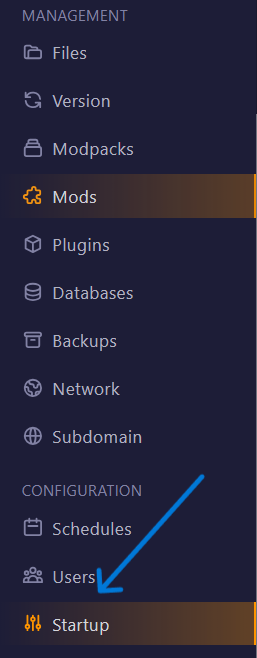
1️⃣ Access the Startup Settings
- Log in to your Lordhosting panel
- Select your Minecraft server
- In the left sidebar, under Configuration, click on Startup
2️⃣ Change the Docker Image
In the top right of the page, you'll see the Docker Image field with a dropdown menu. Click on it to see all available Java versions:
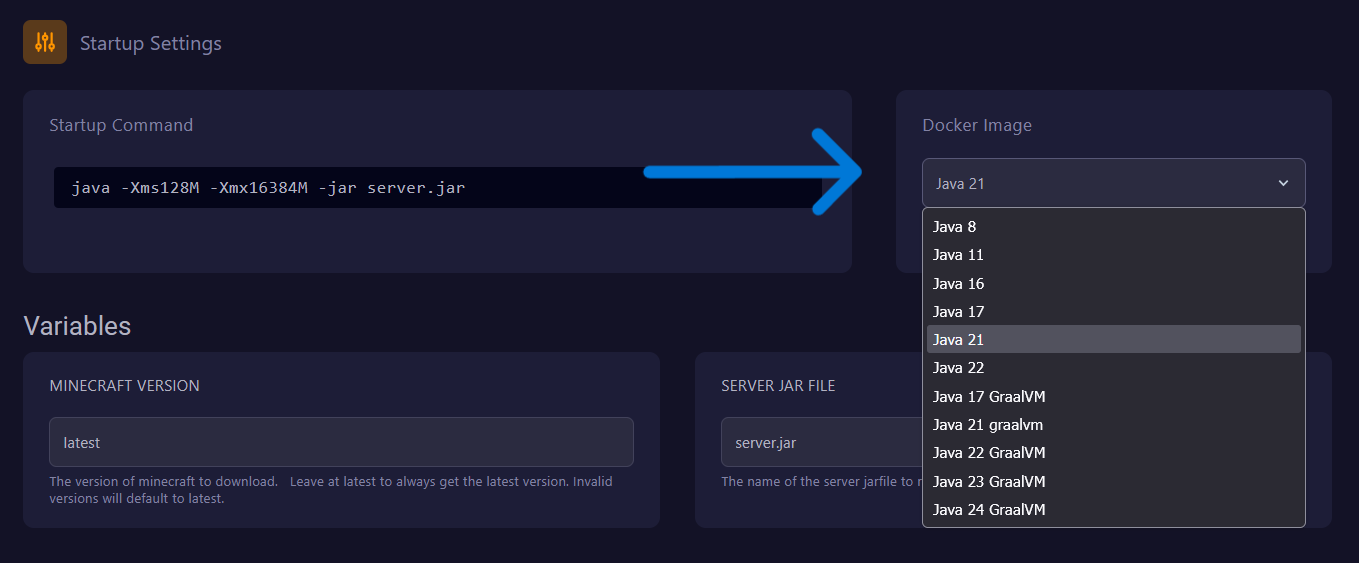
Available Versions on Lordhosting
| Docker Image | Use for |
|---|---|
| Java 8 | Servers 1.16 and before, modpacks 1.12.2 (RLCraft, Pixelmon) |
| Java 11 | Servers 1.16.5 Paper/Spigot |
| Java 16 | Servers 1.17 |
| Java 17 | Servers 1.18 to 1.20.4 |
| Java 21 | Servers 1.20.5+ / 1.21+ (recommended) |
| Java 22 | Experimental versions / snapshots |
| Java 17 GraalVM | Servers 1.18 – 1.20.4 (optimized performance) |
| Java 21 GraalVM | Servers 1.20.5+ (optimized performance) |
| Java 22+ GraalVM | Experimental versions / snapshots |
Select the version that matches your server.
GraalVM is an alternative Java version developed by Oracle, optimized for performance. It can provide 10-20% better performance compared to standard Java. If your server is resource-heavy, try a GraalVM version!
3️⃣ Restart Your Server
Click Restart — the change is applied instantly. No need to reinstall anything, your files and world are preserved.
❌ Common Errors After Changing Java
Server still won't start
→ Make sure you selected the right version. Check the Java/Minecraft compatibility table.
Unsupported class file major version 65
→ Your jar requires Java 21 but you're on Java 17 or lower. Switch to Java 21.
Error: A JNI error has occurred
→ Version conflict. Often caused by a Java version too new for an old modpack. Switch back to Java 8.
Performance degraded after the change
→ Try the GraalVM version of the same Java version. For example, switch from Java 21 to Java 21 GraalVM.
Need help? Our support team is available Monday to Saturday from 10am to 11pm to help you! 🎮