How to Find a Minecraft Server Seed
Want to retrieve your Minecraft world seed to share it, recreate it, or simply know what code generated those beautiful landscapes? This complete guide shows you all possible methods, whether you're a server admin or a regular player.
What Is a Minecraft Seed?
A seed is a numeric code that determines how your Minecraft world is generated. Each seed produces exactly the same world: same biomes, same villages, same structures, same caves.
Famous seed examples:
12345— Spawn near a village and desert temple-4172144997902289642— Minecraft main menu seed (version 1.16)
Important: The same seed generates different worlds depending on the Minecraft version. Seed 12345 in 1.20 won't produce the same world as in 1.18. Always note the version with the seed!
Quick Reference Methods
| Situation | Method | Difficulty |
|---|---|---|
| You're OP/admin in-game | /seed command | Easy |
| You have server panel access | Console: seed | Easy |
| You have file access | server.properties file | Easy |
| Singleplayer without cheats | Open to LAN | Medium |
| You're not admin | Ask the admin | Easy |
| Public server without access | SeedcrackerX (mod) | Advanced |
Method 1: /seed Command In-Game (Easiest)
If you're an operator (OP) on the server or if cheats are enabled:
Steps:
- Connect to your Minecraft server
- Open chat (press
T) - Type the command:
/seed
- The seed appears in chat — click it to copy
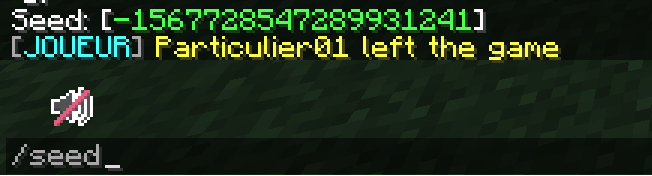
Tip: On Minecraft Bedrock, the command is identical: /seed. It even works if you're not OP!
Not Working?
If you get "Unknown command" or "Insufficient permissions" error:
- Singleplayer world → Enable cheats (see Method 4)
- Multiplayer server → You're not OP, try Method 2 or 3
- Bedrock server → Try without the
/: justseed
Method 2: Via Server Panel Console
If you have access to your server's admin panel (Pterodactyl, Multicraft, etc.), you can retrieve the seed from the console.
Steps:
- Log in to your LordHosting panel
- Select your Minecraft server
- Go to the Console tab
- Type the command (without the slash):
seed
- The seed appears in the console:
[Server] Seed: [-1467692749064778079]
Important: In the server console, commands run without the /. Type seed not /seed.
Method 3: Via server.properties File
The seed is stored in the server configuration file. This method works even when the server is offline.
Steps:
- Access the File Manager in your panel
- Open the
server.propertiesfile (at the server root) - Find the
level-seedline:
level-seed=-1467692749064778079
- The number after
=is your seed
What If level-seed Is Empty?
level-seed=
This means the world was generated with a random seed. In this case:
- Start the server
- Use the
/seedcommand orseedin console - The actual seed will be displayed
Bonus: Once retrieved, you can write it in server.properties for future reference.
Method 4: Singleplayer World Without Cheats
Playing solo with cheats disabled? No problem, here's how to temporarily enable commands:
Steps:
- Load your singleplayer world
- Press Escape → Open to LAN
- Enable "Allow Cheats"
- Click "Start LAN World"
- Now type
/seedin chat
Note: This activation is temporary. When you leave the world, cheats will be disabled again. Your world won't be "corrupted".
Method 5: From World Selection Screen (Singleplayer)
For singleplayer worlds only, you can see the seed without even loading the world:
Minecraft Java:
- Main menu → Singleplayer
- Select your world
- Click Edit (pencil icon)
- The seed is displayed in the world information
Minecraft Bedrock:
- Main menu → Play
- Select your world → Pencil icon (edit)
- Go to Game Settings
- The seed is shown under "Seed"
Finding the Seed Without Admin Access (Public Server)
Playing on a public server and want to know the seed? Here are your options:
Option 1: Ask the Admin
The simplest method! Contact the server team via:
- Server Discord
- Website
- In-game message to a moderator
Option 2: Use SeedcrackerX (Mod)
SeedcrackerX is a Fabric mod that can guess the seed by analyzing world structures.
How Does It Work?
The mod analyzes the positions of generated structures (dungeons, villages, temples...) and uses algorithms to reverse-engineer the seed.
Installation:
- Install Fabric Loader on your client
- Download SeedcrackerX
- Place the
.jarfile in yourmodsfolder - Launch Minecraft and play normally
Usage:
- Explore the server and visit structures (dungeons, temples, villages...)
- The mod automatically collects data
- Use
/seedcrackerto see progress - Once enough data is collected, the seed is revealed
Warning:
- This mod is detectable by some anti-cheats
- Only use it on servers that allow it
- Cracking can take time (multiple structures to visit)
Option 3: World Downloader
The World Downloader mod lets you download chunks you visit. Then, open the downloaded world in singleplayer and use /seed.
How to Change Your Server's Seed
Want to generate a new world with a specific seed?
Steps:
- Stop your server
- Open the
server.propertiesfile - Modify the
level-seedline:
level-seed=123456789
- Delete or rename the
worldfolder (andworld_nether,world_the_endif present) - Restart the server
A new world will be generated with your seed!
Warning: Deleting the world folder permanently removes your current world. Make a backup first!
Best Minecraft Seeds 2026
Looking for interesting seeds? Here's our selection for Minecraft 1.21:
Cherry Blossom Grove Spawn
-5584399987456711267
Spawn in a beautiful blooming cherry forest. Perfect for an aesthetic base!
Village + Trial Chamber Nearby
-41476633031793934
- Witch Hut:
40, 56 - Village:
208, -192 - Trial Chamber:
201, -297
Ideal for farming resources quickly!
Desert + Jungle at Spawn
-2332803749585407299
- Desert Pyramid:
42, 60 - Jungle Temple:
-218, -200 - Village at spawn
- Perfect island for base:
-39, 73
A perfect spawn with access to two rich biomes from the start.
Survival Island with Village
-3821186818805133221
Spawn on an island with a village. Perfect for an island survival challenge!
All Structures Close By
1785852630063679533
Within 1000 blocks of spawn:
- Mansion
- Ocean Monument
- Nether Fortress (accessible via nearby portal)
- Village with blacksmith
FAQ
Do seeds work between Java and Bedrock?
No. Seeds are not compatible between Java Edition and Bedrock Edition. The same seed number generates completely different worlds.
Does a seed generate the same world across all versions?
No. Terrain generation changes regularly. A seed from 1.17 won't produce the same result in 1.21. Always note the version!
Can I find the seed of a corrupted world?
If the world loads (even partially), use /seed. Otherwise, the seed is lost unless you noted it in server.properties.
Does the /seed command reveal my seed to other players?
No, only you see the result of /seed in your chat. Other players see nothing.
How do I share my seed?
Simply copy the number (positive or negative) and share it. Don't forget to mention the Minecraft version and edition (Java/Bedrock).
Related Articles
- How Much RAM for a Minecraft Server? — Size your server correctly
- Which Framework to Choose? — Paper, Forge, Fabric... the complete guide
- Schedule Automatic Restarts — Optimize performance
Create Your Minecraft Server
Want to create your own world with the seed of your dreams? At LordHosting, deploy your Minecraft server in under a minute!
- AMD Ryzen 9 processors
- Ultra-fast NVMe storage
- Anti-DDoS protection included
- Intuitive panel to manage your worlds
- 24/7 support
Need help? Have a question about your server? Our support team is available 24/7. Contact us.