How to Install an Arcadia Echoes of Power Minecraft Server
Arcadia Echoes of Power is a unique Minecraft modpack blending industry and magic. After an epic industrial adventure, you'll discover the symbiosis between iron and sorcery in a completely renewed experience.
🎮 The Arcadia Echoes of Power multiplayer server is available exclusively at LordHosting. You won't find this hosting anywhere else.
Why Choose LordHosting for Your Arcadia Echoes of Power Server?
LordHosting is a French Minecraft hosting provider specializing in modded servers. Thanks to our exclusive integration with Arcadia Echoes of Power, setting up your server takes just a few clicks directly from our Pterodactyl panel.
👉 Order your Minecraft server: https://lordhosting.fr/en/gaming/serveur-minecraft
We recommend the Diamond plan, perfectly suited to the modpack's requirements (RAM, CPU, storage).
Step 1 — Order Your Server
Head over to lordhosting.fr/en/gaming/serveur-minecraft and choose the Diamond plan. You'll receive your panel credentials by email within minutes of your order.
Step 2 — Access the Pterodactyl Panel
Log in to your Pterodactyl management panel using the URL provided in your confirmation email.
Step 3 — Install the Arcadia Echoes of Power Modpack
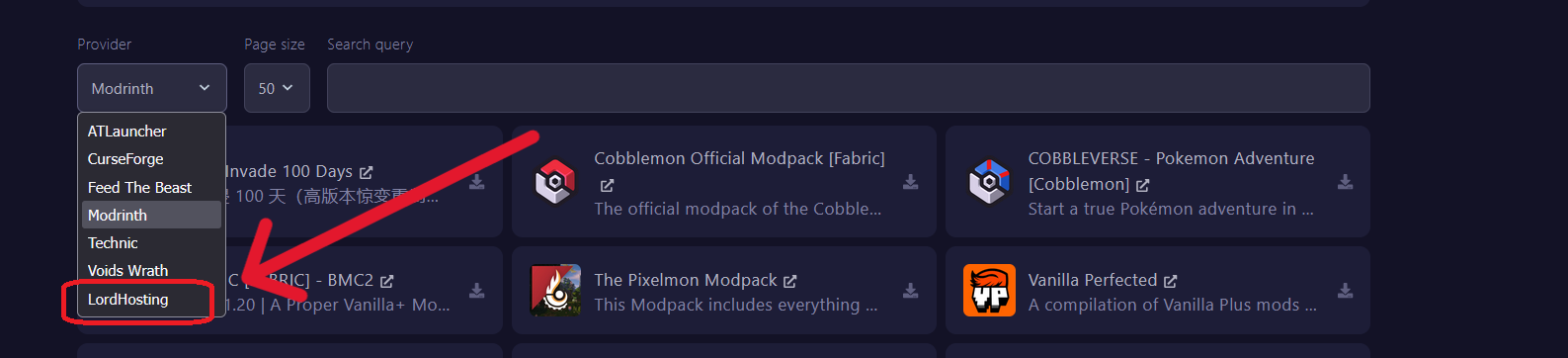
In the panel, go to the Modpacks tab.
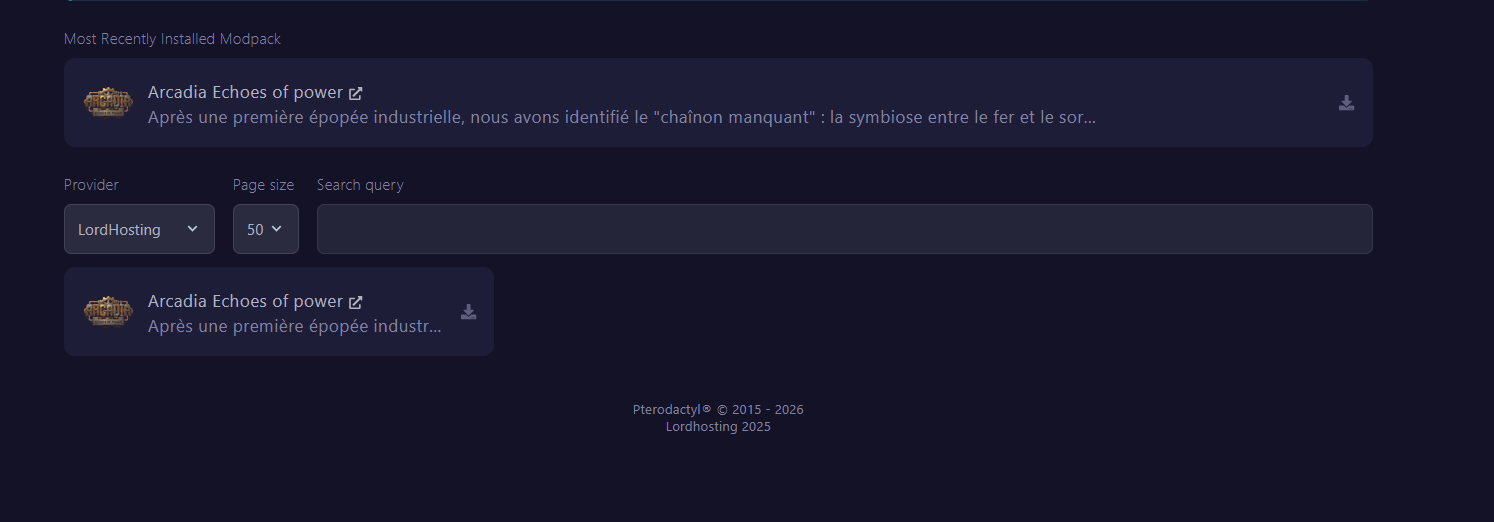
- In the Provider dropdown, select LordHosting
- The Arcadia Echoes of Power modpack will appear in the list
- Click the download icon (↓) on the right side of the modpack
Step 4 — Start the Server
Once installation is complete:
- Click Start to launch the server
- On the first boot, the server will stop automatically and prompt you to accept the Minecraft EULA
Step 5 — Accept the Minecraft EULA
Accepting the EULA (End User License Agreement) is required to run any Minecraft server.
- In the panel, go to Files
- Open the eula.txt file
- Change
eula=falsetoeula=true - Save and restart the server
⚠️ By accepting the EULA, you acknowledge having read Mojang's Terms of Service.
Step 6 — Join Your Arcadia Echoes of Power Server
- Download the client-side modpack on CurseForge: curseforge.com/minecraft/modpacks/arcadia-echoes
- Launch Minecraft with the modpack installed
- In the Multiplayer menu, add your server's IP address (visible in the LordHosting panel)
- Connect and enjoy the adventure!
FAQ — Arcadia Echoes of Power Server
Where can I host an Arcadia Echoes of Power server?
The multiplayer server is available exclusively at LordHosting. It's the only Minecraft hosting provider offering this modpack with automatic installation.
Which plan should I choose to host Arcadia Echoes of Power?
We recommend the Diamond plan for optimal performance with this modpack.
Is the modpack free?
Yes, the client-side modpack download is free via CurseForge. Only the server hosting is paid.
Useful Links
- 🌐 Official website: arcadia-echoes-of-power.fr
- 📦 CurseForge modpack: curseforge.com/minecraft/modpacks/arcadia-echoes
- 🚀 Exclusive hosting: lordhosting.fr/gaming/serveur-minecraft