 Minecraft Java Edition
BungeeCord Documentation
BungeeCord is a Minecraft proxy that connects multiple servers together, providing a smooth and unified gaming experience. With BungeeCord, you can easily manage your plugins, change your server's MOTD, add operators, and update your server.
Github page: https://github.com/SpigotMC/BungeeCord/
Website: https://ci.md-5.net/job/BungeeCord/
Rent a server now: https://lordhosting.fr/en/gaming/bungeecord
Each server behind your BungeeCord network is a Minecraft server hosting instance you can deploy in one click.
⚙️ Adding a plugin to your server
First, you need to go to your game panel, log in, and follow these steps:
- Click on the "File manager" tab to access your server files.
- Next, find the folder named "Plugin" and click on it.
- Press the "Upload" button at the top of your page and select the plugins on your computer/phone that you want to import to your server.
- Wait for the upload to finish, then restart your server.
❗Always good to know
- If an error appears or your plugin does not work, please contact our support team via ticket or Discord.
- Website where you can find plugins:
- https://www.spigotmc.org/resources/categories/bungee-proxy.3/
🔧 Changing your server's MOTD
First, you need to go to your game panel, log in, and follow these steps:
- Click on the "File manager" tab to access your server's files.
- Next, find the file named "config.yml" and click on it.
- By default, you should find a line that says
motd: '&1Another Bungee server'. - Replace the text
&1Another Bungee serverwith the MOTD you want, for example:motd: My awesome server - Once you have found the perfect message, click on the "Save Content" button to save your changes, then restart your server.
👑 Adding an operator to your server
First, you need to go to your game panel, log in, and follow these steps:
- Click on the "File manager" tab to access your server files.
- Next, find the file named "config.yml" and click on it.
- Add a new user as a bungee administrator
groups:
  md_5:
  - admin
  steve:
  - admin
🔧 Update your server
First, you need to download the latest version of BungeeCord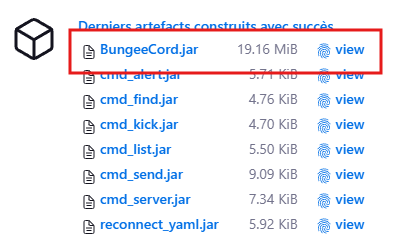
Next, go to your game panel, log in, and follow these steps:
- Stop your server.
- Click on the "File manager" tab to access your server files.
- Delete the "BungeeCord.jar" file.
- Press the "Upload" button at the top of your page and select the file you just downloaded.
- Start your server.
💾 Learn more about files
config.ymlcontains basic settings such as server name, port, maximum viewing distance, etc. These settings can all be safely modified.















